완성된 예제이자 실제 운영 페이지 확인(공백제거)
1. 사용자가 글자를 입력할 textarea를 html로 만든다.
id 값을 나중에 자바스크립트에서 사용할 거니까 정해줌
<textarea id="raw-text"></textarea>2. 사용자가 텍스트를 입력하고, 버튼 클릭시 공백제거 이벤트가 발생할 button을 만든다.
자바스크립트에서 사용할 onclick 이벤트명을 작성한다
버튼에 표시될 텍스트는 Remove가 아니라 제거 등으로 커스텀 가능
<button onclick="removeNewLines()">Remove</button>3. 사용자 편의 & 우클릭 방지 사이트의 완성된 공백제거 텍스트를 복사할 버튼을 만든다.
javascript와 연동될 id 값을 정한다.
마찬가지 버튼 Copy 텍스트 변경 가능
<button id="btn_copy">Copy</button>4. 공백이 제거된 텍스트를 표시할 텍스트 공간을 만든다.
자바와 연동될 id 값을 정한다.
<span id="res-1"></span>5. Remove 클릭시 공백을 제거하는 자바스크립트
<script>
function remove_linebreaks(str) {
	return str.replace( /(\r\n\t|\n|\r\t)/gm, " " );
}
function removeNewLines() {
	var sample_str =
	document.getElementById('raw-text').value;
	console.time();
	document.getElementById('res-1').innerHTML
	= remove_linebreaks(sample_str);
	console.timeEnd();
}
</script>
6. Copy 버튼 클릭시 완성본을 복사하는 JavaScript
<script>
document.getElementById('btn_copy').onclick = function() {
    const valOfDIV = document.getElementById('res-1').innerText;
    const textArea = document.createElement('textarea');
    document.body.appendChild(textArea);
    textArea.value = valOfDIV;
    textArea.select();
    document.execCommand('copy');
    document.body.removeChild(textArea);
}
</script>
7. 모두 합친 결과물과 코드
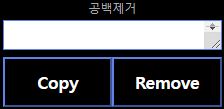
<textarea id="raw-text"></textarea>
<button onclick="removeNewLines()">Remove</button>
<button id="btn_copy">Copy</button>
<span id="res-1"></span>

<script>
function remove_linebreaks(str) {
	return str.replace( /(\r\n\t|\n|\r\t)/gm, " " );
}
function removeNewLines() {
	var sample_str =
	document.getElementById('raw-text').value;
	console.time();
	document.getElementById('res-1').innerHTML
	= remove_linebreaks(sample_str);
	console.timeEnd();
}

document.getElementById('btn_copy').onclick = function() {
    const valOfDIV = document.getElementById('res-1').innerText;
    const textArea = document.createElement('textarea');
    document.body.appendChild(textArea);
    textArea.value = valOfDIV;
    textArea.select();
    document.execCommand('copy');
    document.body.removeChild(textArea);
}
</script>